Showing posts with label Street photography. Show all posts
Saturday, March 19, 2016
Friday, March 4, 2016
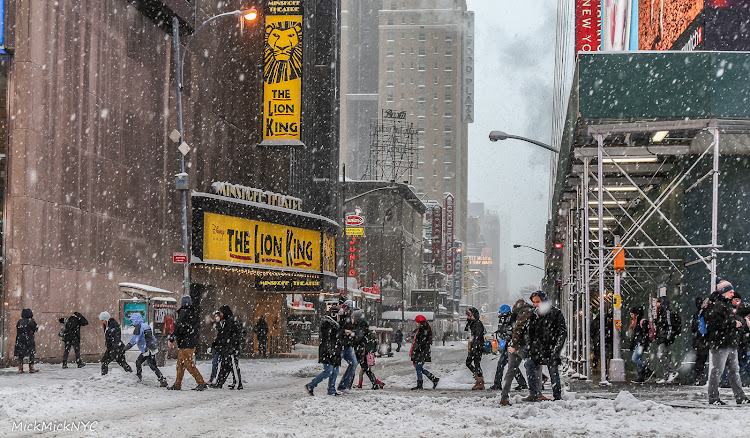
5 Tips for Making the Most Out of the Next Snowstorm
If you live in North America, you probably don’t get too excited about snow. For many, snow is just a nuisance that needs to be cleared out of the driveway, but there is much more to snow than just shoveling. For photographers, snowstorms will give a new and fresh look to a familiar sight. Even in New York City, one of the most photographed cities in the world, you can capture exceptional, never seen before, images during snowstorms. Ask any Eskimo, and he will tell you that snow can come in many forms, each is unique and will have different effect on the environment and therefore on your photos. With that in mind, I compiled some tips that will be helpful if you want to get the best of the next snowstorm.
1. Protect yourself
Leaving the house during a snowstorm or a blizzard can be a very bad idea if you are not prepared. Staying dry, warm and safe while being out in the storm should be your number one priority. Before leaving the house make sure to take with you waterproof gloves and knee-high snow boots. If you have ski equipment, don’t hesitate to use it for your photo shoot. I always wear my waterproof ski outfit when I’m out photographing in the storm. This includes ski mask and goggles. Goggles are especially useful during blizzards as the combination of wind and snow is very painful for the eyes. Underneath all of the above, I wear thermals long sleeved shirt, leggings and socks. Another thing that always helps me stay warm are hand warmers, and my favorite hack is to put them inside the boots.
2. Protect your equipment
As I see it, there are three main options to protect your gear during a storm. The first one, if you are dealing with light snow and no wind, is to go commando - hiding the camera under a jacket or umbrella if you have a friend with you. Some DSLR cameras are weatherproof and my Canon has suffered through many trips in snowstorms without any layers of protection. The second option is buying a camera water protector. I bought one around $10 and it worked beautifully during the latest, 2016 blizzard Jonas. Having said that, if you move around and don’t use a tripod it is not the most convenient option for operating the camera. So a third option is to create your own water protector by using the thickest garbage bag you can find. You simply cut a hole in the bag for the lens, then place the camera inside the bag with just the end of the lens sticking out through the hole. Now, you can mount the lens hood over the plastic bag to keep it from moving and blocking your view. A rubber band can be used as an additional safety measure.
3. Take a friend
During snowstorms the streets are usually empty. A person standing in the middle of the road, holding a black umbrella, can make the difference between a nice photo and an exceptional one. However, finding someone in that perfect position is not an easy task. Moreover, waiting for the right moment to come during a storm can be exhausting. Sending a friend to pose for you, holding that perfect colored umbrella you bought in advance, is much easier and highly recommended for the quality of your photos as well as your safety.
4. Look for landmarks
So you are out on the city streets, during a snowstorm, looking for your next shot. Including the city’s landmarks in your photos is going to be a safe bet. In New York City for example, aim for composition that will make the location recognizable, such as a subway station entrance, Empire State Building and yellow cabs. These will provide an instant context and their familiarity will be the initial bond of the spectator with the photo.
5. Put the finishing touches
Now, after walking in the storm and taking all these images, you come back home only to find out that the beautiful snowflakes are nowhere to be seen. No worries, a few steps in any photo editing app can transform your images from that old winter look to the new and fresh 'winter wonderland' look. A few basic steps that I always start from can help you make that change: Take the highlights down, clarity up and get rid of the shadows. As a result, more details will appear in the image, including the snowflakes. After doing these three steps, you can now better appreciate the quality of your image.
More Tips:
5 Tips for Capturing Beautiful Photos at the Zoo
1. Protect yourself
Leaving the house during a snowstorm or a blizzard can be a very bad idea if you are not prepared. Staying dry, warm and safe while being out in the storm should be your number one priority. Before leaving the house make sure to take with you waterproof gloves and knee-high snow boots. If you have ski equipment, don’t hesitate to use it for your photo shoot. I always wear my waterproof ski outfit when I’m out photographing in the storm. This includes ski mask and goggles. Goggles are especially useful during blizzards as the combination of wind and snow is very painful for the eyes. Underneath all of the above, I wear thermals long sleeved shirt, leggings and socks. Another thing that always helps me stay warm are hand warmers, and my favorite hack is to put them inside the boots.
2. Protect your equipment
As I see it, there are three main options to protect your gear during a storm. The first one, if you are dealing with light snow and no wind, is to go commando - hiding the camera under a jacket or umbrella if you have a friend with you. Some DSLR cameras are weatherproof and my Canon has suffered through many trips in snowstorms without any layers of protection. The second option is buying a camera water protector. I bought one around $10 and it worked beautifully during the latest, 2016 blizzard Jonas. Having said that, if you move around and don’t use a tripod it is not the most convenient option for operating the camera. So a third option is to create your own water protector by using the thickest garbage bag you can find. You simply cut a hole in the bag for the lens, then place the camera inside the bag with just the end of the lens sticking out through the hole. Now, you can mount the lens hood over the plastic bag to keep it from moving and blocking your view. A rubber band can be used as an additional safety measure.
3. Take a friend
During snowstorms the streets are usually empty. A person standing in the middle of the road, holding a black umbrella, can make the difference between a nice photo and an exceptional one. However, finding someone in that perfect position is not an easy task. Moreover, waiting for the right moment to come during a storm can be exhausting. Sending a friend to pose for you, holding that perfect colored umbrella you bought in advance, is much easier and highly recommended for the quality of your photos as well as your safety.
4. Look for landmarks
So you are out on the city streets, during a snowstorm, looking for your next shot. Including the city’s landmarks in your photos is going to be a safe bet. In New York City for example, aim for composition that will make the location recognizable, such as a subway station entrance, Empire State Building and yellow cabs. These will provide an instant context and their familiarity will be the initial bond of the spectator with the photo.
5. Put the finishing touches
Now, after walking in the storm and taking all these images, you come back home only to find out that the beautiful snowflakes are nowhere to be seen. No worries, a few steps in any photo editing app can transform your images from that old winter look to the new and fresh 'winter wonderland' look. A few basic steps that I always start from can help you make that change: Take the highlights down, clarity up and get rid of the shadows. As a result, more details will appear in the image, including the snowflakes. After doing these three steps, you can now better appreciate the quality of your image.
More Tips:
5 Tips for Capturing Beautiful Photos at the Zoo
Sunday, June 28, 2015
Love Wins
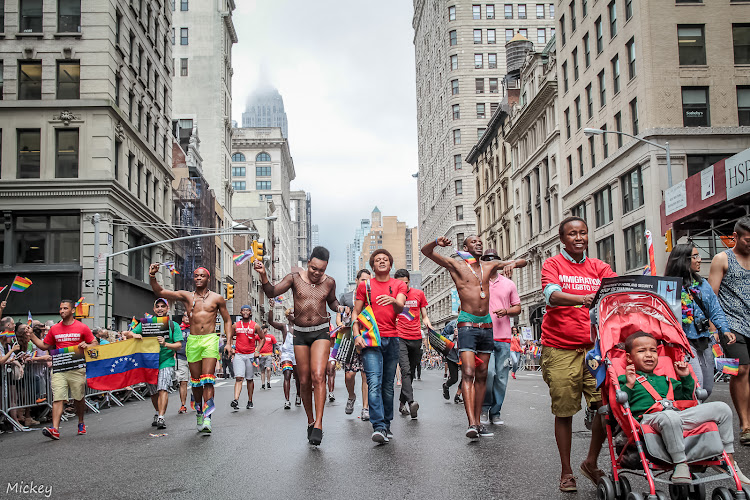
Two days after the historic US supreme court rules in favor of gay marriage (#LoveWins), pride was marching on the streets of New York. Unlike other events in the city, like the Mermaid Parade, Dance Parade or Sakura Matsuri, at this parade most participants didn't put too much effort in their costumes. Nonetheless, it was a very colorful parade, especially because of the rainbow flag.
I missed most of the acts at the parade as I was marching with the Facebook team but I still found a few gems around me.

As usual, the preparation site was the most exciting part of the parade. I found some very cooperative characters that were happy to pose for the camera. A proud mom insisted that I'll capture her heels. She was holding a sign stating that: "My Son Wears Heels Too!".
Finally, it was our turn to walk. It was the first time for me marching in a parade (as apposed to walk in a parade as a photographer).
For this parade I used only the Sigma 17-50mm f/2.8 lens. The weather was crazy. During the first few hours of the parade it was raining and cold and later it was sunny and hot. Surprisingly, I couldn't find Ms. Colombia but I did found this ballerina who reminded me of her.
I noticed that the main interaction between the participants and the crowed involves both parties screaming in excitement towards one another.
During the parade, capturing the flatiron building was a must for me, as this is one of the most iconic buildings in the city. The only problem was that the parade was facing the wrong direction...
I missed most of the acts at the parade as I was marching with the Facebook team but I still found a few gems around me.

As usual, the preparation site was the most exciting part of the parade. I found some very cooperative characters that were happy to pose for the camera. A proud mom insisted that I'll capture her heels. She was holding a sign stating that: "My Son Wears Heels Too!".
Finally, it was our turn to walk. It was the first time for me marching in a parade (as apposed to walk in a parade as a photographer). For this parade I used only the Sigma 17-50mm f/2.8 lens. The weather was crazy. During the first few hours of the parade it was raining and cold and later it was sunny and hot. Surprisingly, I couldn't find Ms. Colombia but I did found this ballerina who reminded me of her.
I noticed that the main interaction between the participants and the crowed involves both parties screaming in excitement towards one another.
Saturday, June 20, 2015
Mermaid Parade
Yes! The Mermaid Parade! I missed it last year, so this year, I was very excited to finally see it in my own eyes. Each time I am surprised that the number of people at these type of events don't stop me of showing up. I found that the attending people; participants as well as staff and observers, create a very welcoming environment, and this is true to all the city events I have been to.
The Mermaid Parade actually started during the subway ride to Coney Island as some of the characters set next to me. It is about an hour ride from Midtown to Coney Island but it felt a lot shorter, funny how time flies when you're having fun.
After getting off the subway I went directly to the preparation zone. This was a true gem as the bricks on the walls were a perfect background for some of the sea creatures. People of all ages showed up in sophisticated outfits that were designed carefully for this event.
Given the overcast sky and the rain that came from time to time I tried, as much as possible, to prevent the sky from entering my frame. I saw a photographer carrying a real, physical, frame which he used as a prop when taking the pictures. I think it helps a little with the white clear sky but I still think the walls were a better option to avoid the boring background.
During the parade preparation I used the Sigma 17-50mm f/2.8 lens and when the parade started I switched to the Canon EF 300mm f/4L. The zoom lens is also an elegant way to avoid the overcast sky.
By now I already know some of the regular parade attendees, like Jack Sparrow's long lost twin and Ms. Colombia, who was, as usual, carrying her African grey parrot on top of her head. It is always nice to see familiar faces in the crowd.
When the parade was over I headed to the subway station. The street was packed with people but there was no shouting or pushing. In the middle of the street there was a group of people offering free hugs. I didn't hesitate and I found myself in the arms of a total strangers. It was the perfect ending for the parade. I hope you can feel the joy of the parade through my photos. See you all at the next parade.
Labels:
2015,
act,
Coney Island,
costume,
event,
Mermaid Parade,
NYC,
ocen,
Parade,
photos,
sea,
sea creatures,
Street photography
Saturday, May 16, 2015
Dance Parade
This year the Dance Parade was awesome! Especially since I got a press pass and I could walk alongside the dancers. Once again, I had a hard time choosing between two lenses: the Sigma 17-50mm f/2.8 and the Canon EF 300mm f/4L. It was a lot easier to take the photos with the Sigma but soon after the parade started I switched to Canon.
Before the parade started I had some great opportunities to photograph the preparations: practicing, assembling gear and resting. The huge frog vehicle was a must for me. It came inside a yellow truck and they needed almost ten men to carry it out from there. The place was surrounded with some more interesting looking vehicles: a wolf like bike, two giants ponies, a purple bus and a furry little green car.
The scene was very colorful and festive, As soon as the ribbon cutting ceremony was over, the parade started marching on Broadway and 21st. I caught this cute girl popping her head out from the bus's window and went to look for my favorite act.
During the preparations I saw a Japanese act of two girls covered with the cherry blossom, hanging out with a golden man. They were fantastic and I immediately declared them as my favorites. Although I have been twice to the Sakura Matsuri festival I have never seen anything like it before.
Another one of my favorites was a pink-haired girl riding on a gigantic "My Little Pony". The pony was so big that I had a hard time capturing all of it. Finally, I snapped a photo with my cellphone.
As for real animals, at the beginning of the parade, I saw Oswaldo Gomez, also known as Ms. Colombia, with her African grey parrot named Rosita. Also, I saw two dogs walking in the parade, one of them was a Chihuahua named "Little One". I was told that Little One never missed a dance parade in the city.
The parade was fun as well as exhausting. By the end of it I could barely walk let alone carry my 300mm lens. I packed everything, took the city bike and headed to recharge myself at Shake Shack. See you all at the next Dance Parade :).jpg)
Before the parade started I had some great opportunities to photograph the preparations: practicing, assembling gear and resting. The huge frog vehicle was a must for me. It came inside a yellow truck and they needed almost ten men to carry it out from there. The place was surrounded with some more interesting looking vehicles: a wolf like bike, two giants ponies, a purple bus and a furry little green car.
The scene was very colorful and festive, As soon as the ribbon cutting ceremony was over, the parade started marching on Broadway and 21st. I caught this cute girl popping her head out from the bus's window and went to look for my favorite act.
During the preparations I saw a Japanese act of two girls covered with the cherry blossom, hanging out with a golden man. They were fantastic and I immediately declared them as my favorites. Although I have been twice to the Sakura Matsuri festival I have never seen anything like it before.
Another one of my favorites was a pink-haired girl riding on a gigantic "My Little Pony". The pony was so big that I had a hard time capturing all of it. Finally, I snapped a photo with my cellphone.
The parade was fun as well as exhausting. By the end of it I could barely walk let alone carry my 300mm lens. I packed everything, took the city bike and headed to recharge myself at Shake Shack. See you all at the next Dance Parade :)
.jpg)
Subscribe to:
Posts (Atom)


.jpg)
.jpg)
.jpg)
.jpg)
.jpg)
.jpg)
.jpg)